Organizing Skills with Folders
As your skill collection grows, organizing them into folders keeps things manageable — and skillshare handles the rest automatically.
Why Organize?
A flat list of 20+ skills becomes hard to navigate:
~/.config/skillshare/skills/
├── accessibility/
├── ascii-box-check/
├── core-web-vitals/
├── frontend-design/
├── performance/
├── react-best-practices/
├── remotion/
├── seo/
├── skill-creator/
├── ui-skills/
├── vue-best-practices/
├── vue-debug-guides/
├── web-artifacts-builder/
└── ... 20+ more
With folders, you get logical grouping while skillshare auto-flattens for AI CLIs:
SOURCE (organized)                     TARGET (auto-flattened)
───────────────────────────────────    ──────────────────────────────────
~/.config/skillshare/skills/           ~/.claude/skills/
├── frontend/                          ├── frontend__frontend-design
│   ├── frontend-design/               ├── frontend__react__react-best-..
│   ├── react/                         ├── frontend__ui-skills
│   │   └── react-best-practices/      ├── frontend__vue__vue-best-prac..
│   ├── ui-skills/                     ├── frontend__vue__vue-debug-gui..
│   └── vue/                           ├── utils__ascii-box-check
│       ├── vue-best-practices/        ├── utils__remotion
│       ├── vue-debug-guides/          ├── utils__skill-creator
│       └── ...                        ├── web-dev__accessibility
├── utils/                             ├── web-dev__core-web-vitals
│   ├── ascii-box-check/               └── ...
│   ├── remotion/
│   └── skill-creator/
└── web-dev/
    ├── accessibility/
    ├── core-web-vitals/
    └── ...
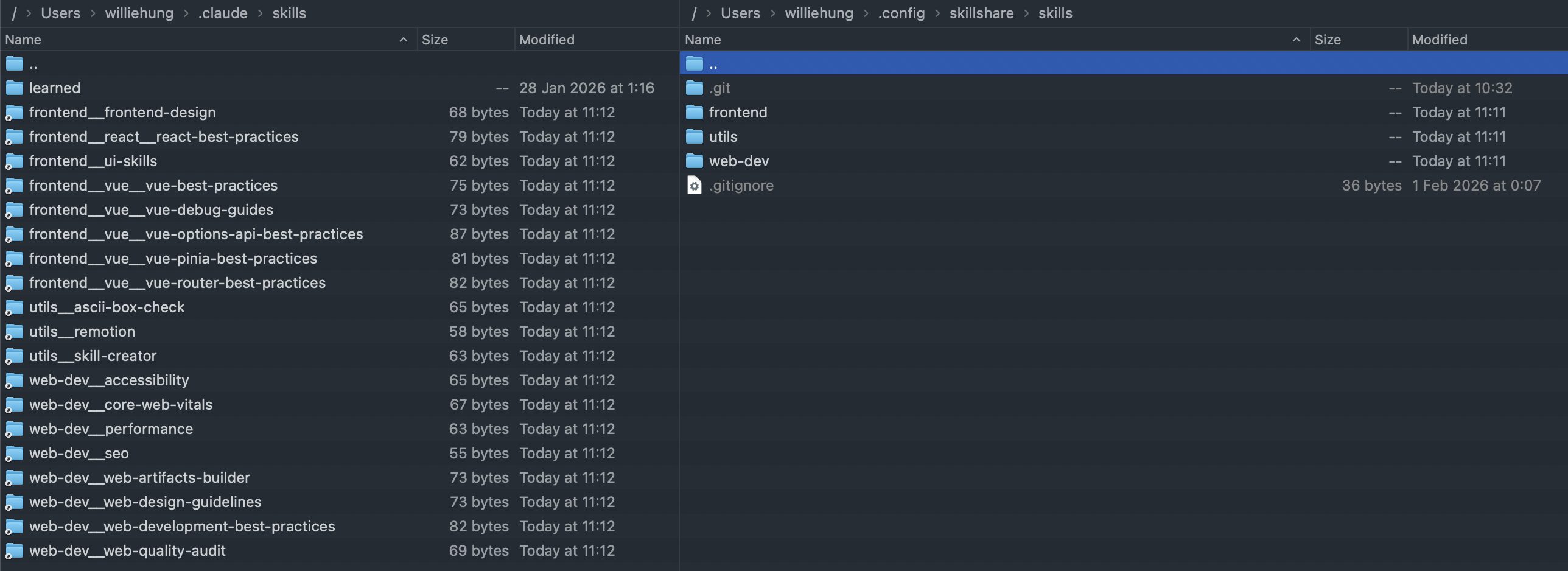
See runkids/my-skills for a complete organized skill collection using this pattern.
How Auto-Flattening Works
skillshare converts folder paths to flat names using __ (double underscore) as separator:
| Source path | Synced target name |
|---|---|
frontend/react/react-best-practices/ | frontend__react__react-best-practices |
utils/remotion/ | utils__remotion |
web-dev/accessibility/ | web-dev__accessibility |
Key points:
- Only directories containing
SKILL.mdare treated as skills - Intermediate folders (like
frontend/itself) are just organizational — they don't needSKILL.md listandsyncdiscover nested skills at any depthcheckandupdatealso work with nested skills
This page is about organizing skills. Agents are always single .md files placed directly under ~/.config/skillshare/agents/ (or .skillshare/agents/ in project mode) — they don't support folder nesting or auto-flattening. To organize agents, use naming conventions (e.g. frontend-reviewer.md, backend-auditor.md) and .agentignore patterns.
Working with Nested Skills
list
Skills in the same directory are grouped together automatically:
$ skillshare list -g

  frontend/vue/
    → vue-best-practices     github.com/vuejs-ai/skills/...

  utils/
    → remotion               github.com/remotion-dev/skills/...

  web-dev/
    → accessibility          github.com/addyosmani/web-quality-...
Within each group, skills show their base name (not the full flat name). Top-level skills appear ungrouped at the bottom. If all skills are top-level, the output is a flat list — identical to the old format.
check
Detects nested skills and shows relative paths:
$ skillshare check -g
! utils/remotion  update available · github.com/remotion-dev/skills

! Updates available for 1 skill, 14 up to date · 2.1s

Next
  skillshare update --all  pull the updates
update
Supports both full paths and short names:
# Full relative path
skillshare update -g frontend/react/react-best-practices

# Short name (basename) — auto-resolved
skillshare update -g react-best-practices

# Update everything
skillshare update -g --all
When a short name matches multiple skills, skillshare asks you to be more specific:
'my-skill' matches multiple items:
  - frontend/my-skill
  - backend/my-skill
Please specify the full path
enable / disable
Folders make it easy to toggle a whole category on or off at once. disable/enable accept glob patterns, so point one at the folder:
# Disable every skill under frontend/ (any depth)
skillshare disable "frontend/**"

# Re-enable the whole folder with the same pattern
skillshare enable "frontend/**"

# Apply to targets
skillshare sync
This writes a single frontend/** line to .skillignore and keeps covering anything you add to the folder later. To toggle individual skills instead, pass their names (skillshare disable frontend/react/react-best-practices).
Wrap folder patterns in quotes ("frontend/**") so your shell doesn't expand * first.
See enable / disable and .skillignore syntax for details.
Install Directly into Folders
Use --into to install a skill into a subdirectory in one step — no manual mv needed:
# Install into a category folder
skillshare install anthropics/skills -s pdf --into frontend
# → ~/.config/skillshare/skills/frontend/pdf/

# Multi-level nesting
skillshare install ~/my-skill --into frontend/react
# → ~/.config/skillshare/skills/frontend/react/my-skill/

# Works with --track too
skillshare install github.com/team/skills --track --into devops
# → ~/.config/skillshare/skills/devops/_team-skills/

# Works in project mode
skillshare install anthropics/skills -s pdf --into tools -p
# → .skillshare/skills/tools/pdf/
After skillshare sync, targets show auto-flattened names:
frontend/pdf/→frontend__pdffrontend/react/my-skill/→frontend__react__my-skilldevops/_team-skills/frontend/ui/→devops___team-skills__frontend__ui
--into creates intermediate directories automatically. No need to mkdir first.
Suggested Folder Structures
By domain
skills/
├── frontend/
│   ├── react/
│   ├── vue/
│   └── css/
├── backend/
│   ├── api-design/
│   └── database/
├── devops/
│   ├── docker/
│   └── ci-cd/
└── utils/
    ├── git-workflow/
    └── code-review/
By tool ecosystem
skills/
├── vue/
│   ├── vue-best-practices/
│   ├── vue-debug-guides/
│   ├── vue-pinia-best-practices/
│   └── vue-router-best-practices/
├── react/
│   └── react-best-practices/
└── web/
    ├── accessibility/
    ├── performance/
    └── seo/
Mixed: personal + tracked repos
skills/
├── frontend/              # Personal organized skills
│   └── vue/
├── utils/                 # Personal utilities
│   └── ascii-box-check/
├── _team-skills/          # Tracked repo (auto-updated)
│   ├── code-review/
│   └── deploy/
└── _org-standards/        # Another tracked repo
    └── security/
Version Control Your Skills
Organizing skills in folders pairs naturally with git:
skillshare init --remote [email protected]:yourname/my-skills.git
skillshare push -m "organize skills into categories"
This gives you:
- History of skill changes across machines
- Backup via GitHub/GitLab
- Sharing — others can browse and fork your collection
- Cross-machine sync via
skillshare pull(see Cross-Machine Sync)
Migrating from Flat to Folders
For new skills, use --into to install directly into the right folder — see Install Directly into Folders above.
Skills you created yourself (with skillshare new or by hand) have no install record, so you can move them with mv:
cd ~/.config/skillshare/skills
mkdir -p frontend/react
mv my-react-notes frontend/react/
skillshare sync
After sync, targets are updated automatically — old flat symlinks are cleaned up and new flattened names are created.
skillshare installDo not move an installed skill with mv. Its install record in .metadata.json is keyed by its path, so the moved copy loses its source link and the record still points at the old location. Reinstall it into the folder instead:
skillshare list -v react-best-practices            # note the Source
skillshare uninstall react-best-practices
skillshare install <source> --into frontend/react
skillshare sync
Repeat any flags from the original install, such as --track.
See Also
- Source & Targets — How flattening works
- Tracked Repositories — Nested skills in repos
- Best Practices — Naming conventions
- install — Install with
--intofor subdirectories