Manage plugins across tools
A plugin can include skills, MCP connections, hooks, scripts, and other files that work together. Skillshare keeps that package intact and lets you select which tools receive it. You do not need to write YAML to get started.
Add your first plugin
In the dashboard, open Plugins → Add plugin:
- Paste a GitHub repository (
owner/repo), HTTPS Git URL, or local directory. - Choose a plugin if the source contains several, then select compatible tools.
- Review the changes and apply them.
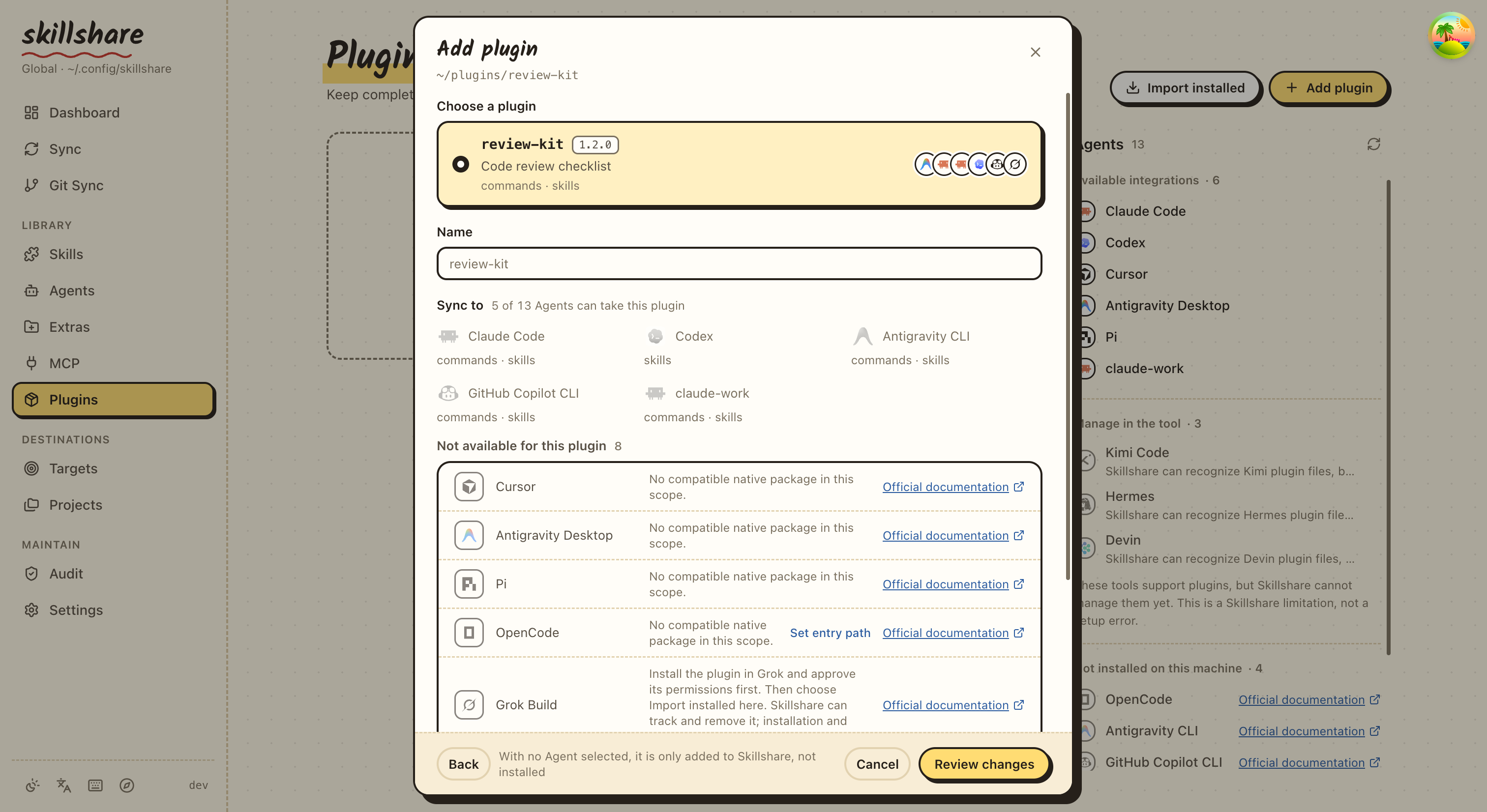
Most users only need a repository and target checkboxes. Advanced options adds a Git ref, to choose a release. Discovery shows each target's components and compatibility separately. When OpenCode is listed as unsupported because its entry could not be detected, Set entry path on that row takes the built file and searches the source again, keeping what you already chose. Safe relative repository symlinks are preserved.
The same guided flow is available in a terminal:
skillshare plugin add
Claude Code, Codex, Copilot, Antigravity CLI, Grok, Pi, or OpenCode CLI must be installed where the Skillshare backend runs.
For Codex, the CLI inside the Codex desktop app counts; on a machine where Codex is elsewhere, set SKILLSHARE_CODEX_CLI.
Cursor and Antigravity desktop instead receive complete files in their local plugin directories.
A dashboard running inside a container cannot manage plugins installed only on
the host machine. Use the local CLI, or run Skillshare beside the native clients.
Install targets are Claude Code, Codex, Cursor, Antigravity Desktop, Antigravity CLI,
GitHub Copilot CLI, Pi, and OpenCode. Grok requires native installation and trust
before import. Kimi, Hermes, and Devin formats are discoverable; their automatic
installation is unavailable and the interface explains why.
Choose the format published for your target; Skillshare does not translate plugins
between tools. Project mode supports Claude, Antigravity Desktop, Pi, and OpenCode.
Antigravity Desktop (antigravity or agy) and CLI (antigravity-cli) use separate
stores. Choose the one you run.
Already installed something?
Choose Import installed and select a native installation. Importing records it without reinstalling, copying its authentication, or changing whether it is enabled in its Agent. Import is available for Claude, Codex, Copilot, Antigravity CLI, Grok, Pi, and OpenCode; use Add plugin for Cursor and Antigravity local packages. To import several at once, tick them (or an Agent's header) and choose Import selected; each is imported in turn and the dialog stays open. An installation with resource filters is imported on its own, after a review.
skillshare plugin import review@team --from claude --no-tui
If a logical package uses different native distributions for different tools,
add/import each distribution using the same --name and the appropriate target.
Skillshare does not infer equivalence from display names.
An import records this machine's native installation. A new machine skips a
native-only declaration until you install it natively and import its local ID
with the same --name. The dashboard package selector and TUI named import choices
can attach it to that declaration. Importing into an existing source-managed target
leaves its shared recipe and other machines' installations unchanged. For source
review and migration requirements, see
Cross-Machine Sync — Plugins.
Choose where to sync
Each managed binding has a checkbox. The checkbox means include this target in sync, not “enable inside the Agent.”
- Check it, then sync to install a missing plugin.
- Opening a plugin's row also lists, unticked, the other Agents its source has a package for. Ticking one opens the install preview. Agents the source cannot serve are counted at the end of the row, and that count opens the reasons.
- A plugin can be added with no Agent ticked. It is kept in Skillshare, shown as No Agents yet, and nothing is installed until you tick an Agent in its row.
- Uncheck it, then sync to remove that managed installation.
- The package definition remains, so you can select the target again later.
- A plugin disabled inside Claude or Codex stays disabled; manage native settings in that tool.
In the dashboard, the Sync box at the top right of the Plugins page lists what the next sync would install or remove for each Agent. Its button opens a preview; nothing changes in an Agent until you confirm it. The plugin list appears at once, while the Agents column below the box fills in as each Agent's CLI answers. After a run, the box lists what happened: failures first, then other changes, with Agents that ended the same way on one row. What stayed the same is folded into one Unchanged line, which opens to one row per plugin, Pi packages apart. The preview folds what it leaves alone the same way, below the changes it will make. The list shows the installed version of every Pi package, read from the package Pi installed.
skillshare plugin disable review --target codex --no-tui
skillshare sync plugins --dry-run
skillshare sync plugins --no-tui
A plugin's menu has View files: the reviewed local copy of its source, read only, with rendered Markdown. An imported plugin has no local copy, so it has no such entry.
Share in the page header, or in a plugin's menu, lists the plugins added from an
HTTPS Git source. Tick several and copy one command that adds them all in order, each
with the same source, plugin, name, ref, and entry. Every add passes -g, so the
plugins go to the global configuration even when the command runs inside a project.
By default the command also passes --no-tui, so it adds every plugin to Skillshare
without prompting; whoever runs it then ticks Agents on the Plugins page to install. Tick Ask which Agents to install each
plugin to to leave out --no-tui, so each add opens its Agent picker instead. Plugins from a local directory are not listed, because the path
only exists on your machine.
Plugins are separate from ordinary skills and MCP synchronization. Their bundled components are not also copied into standalone Skillshare sources.
Updates and recovery
The Plugins page checks for updates when it opens, and Check updates checks
again on demand. A row whose source has a newer version shows old → new, and
the header button reads Update N. It opens one dialog that lists every plugin
with an update, ticked by default, with the Agents it is installed on; untick a
plugin or an Agent to leave it out. Update N plugins runs the picks one at a
time and shows each row as waiting, updating, updated, failed or skipped.
Stop after this one finishes the running plugin and leaves the rest. A failed
row names the Agents that updated and the ones that failed, with the error, and
Retry sends only the failed Agents. The results update the page, so there is
no need to check again. A source that changed since the check installs nothing;
check again to review the new version. An npm package in Pi is the exception: Pi
installs the version npm names latest. When everything is up to date, the
dialog lists each plugin with its Agent and version.
Claude can update through its native CLI. Codex adds the plugin again from the reviewed snapshot, unless it is disabled in Codex, which adding would turn back on; an imported Codex plugin is updated by upgrading its marketplace. Cursor and Antigravity replace managed local copies after checking for local edits. Pi and OpenCode update the reviewed snapshot. Copilot and Antigravity CLI can refresh a reviewed source while preserving known enabled state. Grok updates stay in the native tool, and the dialog lists such installs apart under Update inside the Agent; see the command reference for imported-package limits. A source that no longer provides a compatible plugin is listed under Cannot update. A target an update cannot reach is skipped with the reason, and the plugin's other Agents still update.
An npm package in Pi has no source to compare, so the check compares its installed version with the latest version on npm.
If one target fails, the result keeps the successful outcomes. Resolve the native client's authentication or configuration issue, then sync that target again:
skillshare sync plugins review --target claude --no-tui
Snapshots are owned by Skillshare. If their content has been edited externally, Skillshare blocks replacement so you can preserve those edits first. Source digests detect changes; they are not a guarantee that every native installation or imported marketplace is reproducible across machines.
For automation, scope details and all flags, see plugin.