Using skillshare in Herdr
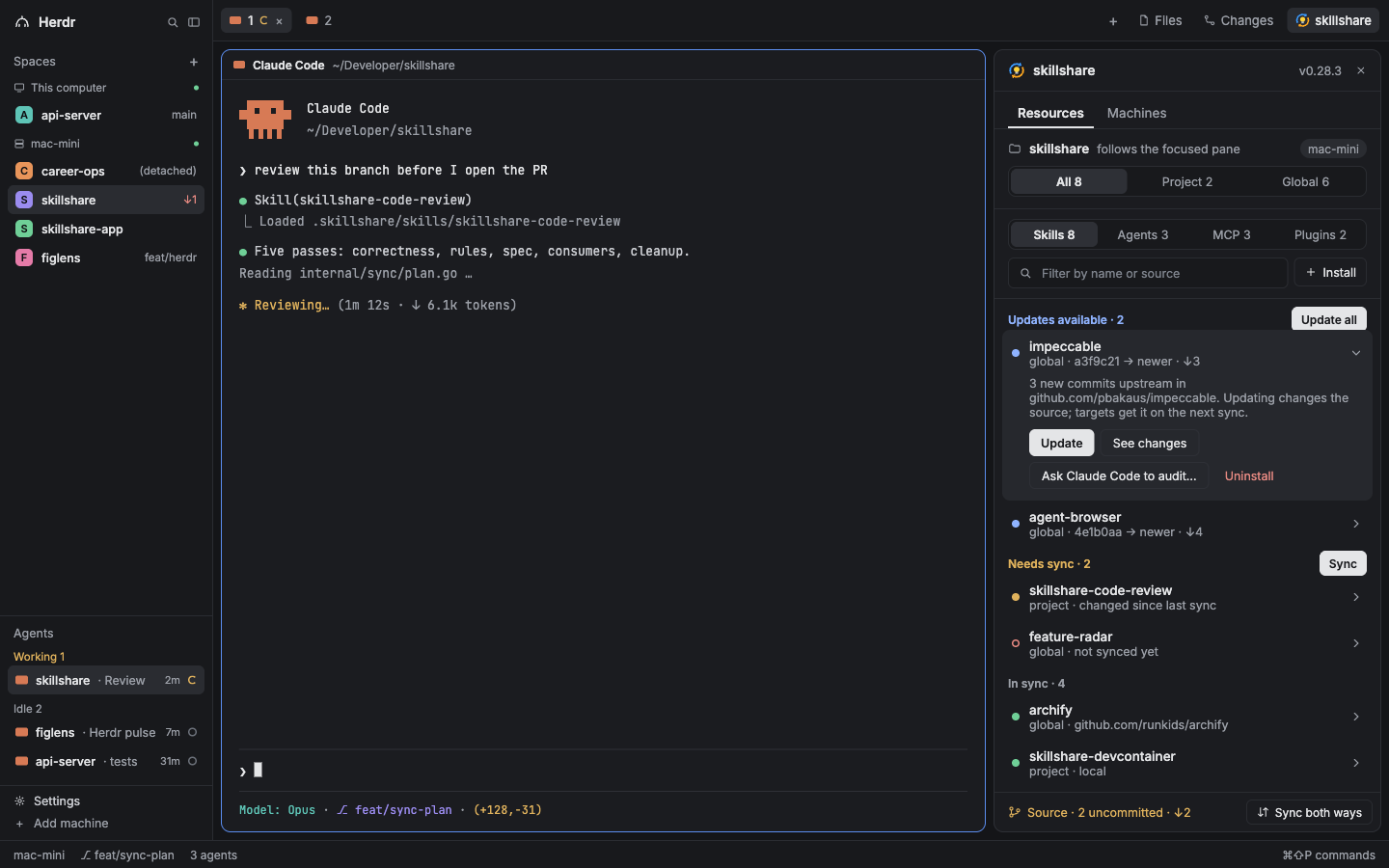
A skillshare panel beside your agents: see what needs an update or a sync, and act on it without leaving Herdr.
Prerequisites
- Herdr 0.1.12 or later
- skillshare installed on each machine Herdr connects to, in
~/.local/bin,~/go/bin,/opt/homebrew/binor/usr/local/bin
Setup
The panel ships in the skillshare repository under herdr/skillshare.
- Copy
mods/skillshare/to~/.config/herdr-app/mods/skillshare/. - Copy
layouts/herdr-skillshare.jsonandlayouts/herdr-skillshare.pngto~/.config/herdr-app/layouts/, then switch to theherdr-skillsharelayout in Herdr's settings. To keep your own layout instead, add the two blocks listed in the folder'sREADME.md. - Run
herdr-app check ~/.config/herdr-app/mods/skillshare.
A skillshare button appears in the tab bar. It shows and hides the panel, and the panel stays open or closed as you switch spaces.
What the Panel Does
The panel follows the space Herdr shows. It runs skillshare on that space's machine, in the focused terminal's folder.
- Resources lists skills, agents, MCP servers and plugins, grouped into Updates available, Needs sync and In sync. In a project with
.skillshare/config.yaml, an All · Project · Global switch picks the scope. - Rows open in place. Skills and agents offer Update, Diff, Uninstall, and Ask <agent> to audit…, which sends the item to the focused Herdr agent after you confirm.
- Install takes a repository URL. A repository with several skills shows a pick list. The panel clones it, runs
skillshare auditon the clone, and installs only when the audit passes. A blocked audit shows the findings, with Install anyway (--force) and Ask <agent> to review…. - Source shows your source repository's state. Its dialog offers Pull, Commit and push, and Sync both ways. When a pull stops on files both machines changed, you pick a version per file from a side-by-side preview.
.metadata.jsonmerges per entry, the wayskillshare pulldoes. - Machines shows each Herdr machine's skillshare version, source state and doctor warnings, with Pull and sync and, when a newer release exists, Update.
The panel refreshes every 20 seconds while it is shown, runs skillshare check every 10 minutes, and does nothing while hidden.