backup
Create, list, and manage backups of target directories.
skillshare backup              # Backup all skill targets
skillshare backup claude       # Backup specific target
skillshare backup agents       # Backup all agent targets
skillshare backup --all        # Backup skills + agents
skillshare backup --list       # List all backups
skillshare backup --cleanup    # Remove old backups
skillshare backup --delete 2026-01-19_10-00-00  # Delete one backup
skillshare backup files        # Versions of single files skillshare rewrote
When to Use
- Create a manual backup before risky changes
- List existing backups to check recovery options
- Clean up old backups, or delete one you no longer need
- Get back an earlier version of a file such as
AGENTS.mdorCLAUDE.md
Automatic Backups
Backups are created automatically before:
skillshare sync(skill targets and agent targets)skillshare sync agents(agent targets only)skillshare target remove
Location: ~/.local/share/skillshare/backups/<timestamp>/ (global), .skillshare/backups/ (project mode, agents only)
Retention is applied automatically after each automatic backup, using the same policy as --cleanup. You do not need to prune snapshots by hand.
Commands
Create Backup
skillshare backup              # All targets
skillshare backup claude       # Specific target
skillshare backup --dry-run    # Preview
List Backups
skillshare backup --list
Backups  ~/.local/share/skillshare/backups
  2026-01-20_15-30-00  claude, cursor · 4.2 MB
  2026-01-19_10-00-00  claude · 2.1 MB
  2026-01-18_09-00-00  claude, cursor · 4.0 MB

3 backups, 10.3 MB

Next
  skillshare restore <target> --from <timestamp>  roll a target back
Cleanup Old Backups
skillshare backup --cleanup           # Remove old backups
skillshare backup --cleanup --dry-run # Preview cleanup
Default cleanup policy:
- Keep last 10 backups
- Remove backups older than 30 days
- Cap total size at 500 MB
Change the count and size limits in the global config, or from the retention summary on the dashboard's Target folders tab. 0 means no limit. The 30-day limit is fixed, and project snapshots keep the defaults.
backup:
  max_count: 20      # default 10
  max_size_mb: 1000  # default 500
The newest snapshot is always kept, even when it alone exceeds the size cap — you are never left without a restore point.
This same policy runs automatically after every sync, so --cleanup is only needed to prune on demand.
Delete a Backup
skillshare backup --delete 2026-01-19_10-00-00            # Delete one snapshot
skillshare backup --delete 2026-01-19_10-00-00 --dry-run  # Show what would be deleted
skillshare backup --delete 2026-01-19_10-00-00 -p         # From the project's .skillshare/backups/
The timestamp is the folder name shown by --list. The whole snapshot is deleted, including every target in it.
File History
Before skillshare rewrites or replaces a single file — an instruction file such as AGENTS.md or CLAUDE.md, or a location of a shared file — it saves the old content. backup files lists and restores those versions.
skillshare backup files                                   # Files with saved versions
skillshare backup files show ~/.claude/CLAUDE.md          # Versions of one file, newest first
skillshare backup files restore ~/.claude/CLAUDE.md origin
skillshare backup files restore ./CLAUDE.md 1769000000000000000.shim --dry-run
Versions  ~/.claude/CLAUDE.md
  1769000000000000000.edit        2026-01-21 12:53:20  history/edit          2.1 KB  # Team rules
  drift:1768900000000000000.mode  2026-01-20 09:06:40  drift/mode            1.9 KB  # Team rules
  origin                          2026-01-10 08:00:00  origin                1.2 KB  # My notes
Each version has an ID:
| ID | Kind | Meaning |
|---|---|---|
<time>[.<reason>] | history | Saved before skillshare wrote the file |
drift:<time>[.<reason>] | drift | An edit of yours that skillshare replaced |
origin | origin | The file as it was when a shared file was first attached; removing that location restores it automatically. If there was no file, restoring it deletes the current one |
The reason says what skillshare was about to do:
| Kind | Reason | Saved before |
|---|---|---|
history | convert | Converting the file to, or renaming it as, AGENTS.md |
history | shim | Adding @AGENTS.md to a project file |
history | edit | An edit in the dashboard |
history | collect | Collecting a target's changes into the shared file |
history | attach | The shared file replaced it when first attached |
history | restore | Restoring an older version |
history | migrate | A sync saving the config without the MCP settings 0.23.0 retired. See Upgrading Pi from 0.22 |
drift | overwrite | You edited the file directly and chose Overwrite |
drift | mode | Switching the location's mode |
drift | restore | Restoring the location |
Versions saved by older releases have no reason. The last 10 of each kind are kept per file.
restore saves the current content first as a new version with reason restore, then writes the chosen one. If the path is a symlink, it refuses unless you add --unlink, which replaces the link with a regular file.
backup files follows the mode: inside a project (or with -p) it lists only files in that project, and show / restore refuse paths outside it; -g covers every file. Because files is a subcommand, back up a target that is literally named files with skillshare backup -t files.
Dashboard
Settings › Backup in skillshare ui has three tabs:
- Target folders — the snapshots above, grouped by day. Filter by target or Agents only. Open a snapshot to see each folder's file count and size, Restore any one of them (skill and agent entries alike), Copy path, or Delete this backup. Back up now and Clean up old backups match
backupand--cleanup. The retention summary next to them opens a panel to change the count and size limits, and Delete all removes every snapshot after you confirm. Files, MCP and Hooks backups are not affected. - Files — the file history above. Pick a file to see its versions with their reason, then Preview and restore shows the diff with the current file or the full version. A linked location is replaced by a regular file only after you confirm Restore and cut the link.
- MCP — the backups taken before each MCP config write, grouped by Agent config, with the servers each one added, changed or removed. Preview and restore opens the same restore dialog as the MCP page (or
mcp restoreon the command line).
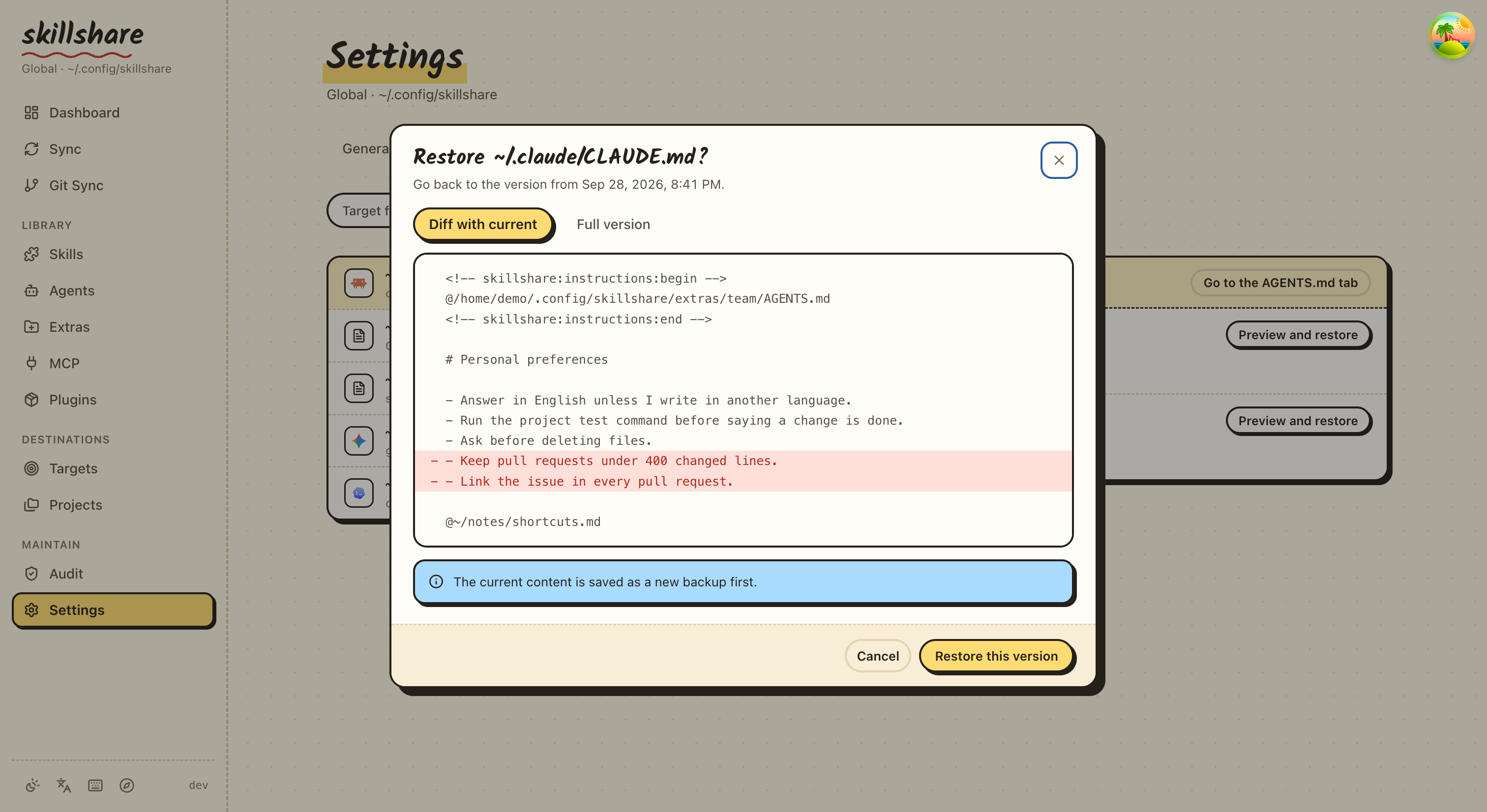
In project mode the page covers only the project: its agent snapshots in .skillshare/backups/, files inside the project, and the backups of its MCP configs. Deleted skills and agents are not here; they go to the Trash tab of Skills and Agents.
Options
| Flag | Description |
|---|---|
--all | Backup both skills and agents |
--project, -p | Use project mode (.skillshare/backups/); agents only |
--global, -g | Use global mode (default for skills) |
--list, -l | List all backups; with -p, the project's |
--cleanup, -c | Remove old backups; with -p, the project's |
--delete <timestamp> | Delete one backup; with -p, from .skillshare/backups/ |
--target, -t <name> | Target specific backup (alternative to positional arg) |
--dry-run, -n | Preview without making changes |
backup files has its own options: --project, -p, --global, -g, and for restore, --unlink and --dry-run, -n. See File History.
backup also accepts a positional kind argument: skillshare backup agents scopes the backup to agent targets only.
Backup Structure
~/.local/share/skillshare/backups/
├── 2026-01-20_15-30-00/
│   ├── claude/
│   │   ├── skill-a/
│   │   └── skill-b/
│   └── cursor/
│       ├── skill-a/
│       └── skill-b/
└── 2026-01-19_10-00-00/
    └── claude/
        └── ...
The skill directories present depend on the target's mode — see What Gets Backed Up.
What Gets Backed Up
A backup protects only what sync could destroy: local content that exists in the target but not in your source.
- Regular files and directories in targets are backed up
- Per-skill symlinks in merge-mode targets are skipped — they point into your source, which is the single source of truth and already safe.
skillshare syncrecreates them
This means:
- In merge mode: Only local (non-symlinked) skills are backed up. Synced skills live in the source
- In copy mode: All managed skill directories are backed up (they are real files)
- In symlink mode: Nothing is backed up (entire directory is a single symlink)
If a target contains nothing but symlinks, no backup is created and backup reports nothing to do — an empty restore point is not useful.
Backups & Disk Space
Backups never copy your source, so they stay small. Three separate mechanisms are easy to confuse:
| Mechanism | Scope | What it controls |
|---|---|---|
.gitignore in your source | Git only | What Git tracks. Ignored files still exist on disk |
ignore: in config.yaml | sync | Which files sync copies into targets (mainly copy mode). See sync |
| Backup | Snapshot | Local target content only — symlinks and therefore source artifacts are excluded |
Because symlinked skills are not followed, heavy artifacts living inside a source skill (model weights, .venv, browser profiles, media) are never copied into a snapshot, whether or not .gitignore or ignore: mentions them.
Retention runs automatically after every sync, using the default policy below. To inspect usage manually:
du -sh ~/.local/share/skillshare/backups   # Total size on disk
skillshare backup --list                   # Per-snapshot sizes
skillshare backup --cleanup --dry-run      # Preview what retention would remove
Copy-mode targets are the one case where snapshots can still grow: those are real files, so anything under a skill directory is copied. Keep runtime caches and large artifacts outside the skill tree, or exclude them with ignore: so they never reach the target in the first place.
Agent Backup
Agents have their own backup flow that runs alongside skill backups, with two distinctions worth knowing:
Entry naming. Agent backups are stored under <target>-agents/ inside each timestamp directory, parallel to the skill backup. For example, after skillshare backup --all the layout looks like:
~/.local/share/skillshare/backups/2026-01-20_15-30-00/
├── claude/          # Skills backup for claude
├── claude-agents/   # Agents backup for claude
└── cursor/
Project mode is the inverse of skills. In project mode (-p), backup refuses to back up skill targets but does back up agent targets. The error you'll see if you forget the agents filter:
backup is not supported in project mode (except for agents)
So in project mode you must say either skillshare backup -p agents or skillshare backup -p --all. --list -p and --cleanup -p need no filter; they work on .skillshare/backups/.
skillshare backup agents                  # All agent targets (global)
skillshare backup agents claude           # Only claude's agents
skillshare backup agents -p               # Project agent targets
skillshare backup --all                   # Skills + agents in one shot
See Agents for the agent resource model and restore for recovery.
See Also
- restore — Restore from backup
- sync — Auto-creates backups
- target remove — Auto-creates backups