audit
Scan installed skills for security threats and malicious patterns.
skillshare audit                        # Scan all installed skills
skillshare audit <name>                 # Scan a specific installed skill
skillshare audit a b c                  # Scan multiple skills
skillshare audit --group frontend       # Scan all skills in a group
skillshare audit <path>                 # Scan a file/directory path
skillshare audit --threshold high       # Block on HIGH+ findings
skillshare audit -T h                   # Same as --threshold high
skillshare audit --format json           # JSON output
skillshare audit --format sarif         # SARIF 2.1.0 output (GitHub Code Scanning)
skillshare audit --format markdown      # Markdown report (for GitHub Issues/PRs)
skillshare audit --json                 # Same as --format json (deprecated)
skillshare audit -p                     # Scan project skills
skillshare audit --quiet                # Only show skills with findings
skillshare audit --yes                  # Skip large-scan confirmation
skillshare audit --no-tui               # Plain text output (no interactive TUI)
skillshare audit --profile strict       # Use strict profile (block on HIGH+)
skillshare audit --dedupe global        # Full composite-key deduplication
skillshare audit --analyzer static      # Run only the static analyzer
skillshare audit --analyzer static --analyzer dataflow  # Multiple analyzers
When to Use
- Review security findings after installing a new skill
- Scan all skills for prompt injection, data exfiltration, or credential access patterns
- Customize audit rules for your organization's security policy
- Generate audit reports for compliance (
--format json), static analysis tools (--format sarif), or documentation (--format markdown) - Integrate into CI/CD pipelines to gate skill deployments
- Upload SARIF results to GitHub Code Scanning for PR-level annotations
What It Detects
The audit engine scans every text-based file in a skill directory against 100+ built-in rules (regex patterns, table-driven credential detection, structural checks, content integrity verification, and supply-chain trust analysis), organized into 5 severity levels: CRITICAL, HIGH, MEDIUM, LOW, and INFO.
Markdown examples are still scanned. SDK-style system: / System: parameters in parsed fenced code blocks (prompt-injection-1) are reported as HIGH rather than CRITICAL when their value has a parameter-like shape. Generic disclosure restrictions such as "Do not tell the user they need to adopt an eval framework" use the HIGH rule prompt-injection-5 in all file types. Explicit concealment remains CRITICAL under prompt-injection-4. HIGH warns at the default CRITICAL threshold and blocks under strict; see Prompt Injection for limitations and rule-override compatibility.
For the full detection catalog, threat categories deep dive, risk scoring algorithm, command safety tiering, and cross-skill interaction analysis, see Audit Engine.
Example Output
skillshare audit
Audit  ~/.config/skillshare/skills
  global · blocks at CRITICAL · policy DEFAULT / dedupe:GLOBAL / analyzers:ALL

! ci-release-helper  HIGH · risk 25/100
✗ suspicious-skill   CRITICAL · risk 35/100

Summary
  Scanned      12 skills
✓ Passed       9
! Warning      2
✗ Failed       1
  Severity     1 critical, 2 high, 1 medium
  Threats      credential:1 exfiltration:1 injection:1 privilege:1
  Risk         HIGH 35/100 · 100% auditable

✗ Blocked 1 of 12 skills: findings at CRITICAL or above · 2.1s
  The risk score is informational; only the severity blocks

Next
  skillshare audit suspicious-skill  see its findings
Failed counts skills with findings at or above the active threshold (--threshold or config audit.block_threshold; default CRITICAL).
Threats shows a category breakdown of all findings using short names: inj (injection), exfil (exfiltration), cred (credential), obfusc (obfuscation), priv (privilege), integ (integrity), struct (structure), risk (risk). This line is omitted when there are no findings. In terminal output, each category is color-coded by threat type.
audit.block_threshold only controls the blocking threshold. It does not disable scanning.
Interactive TUI Mode
When scanning several skills in an interactive terminal, audit opens a full-screen view instead of printing results line by line: skills on the left with findings first, and the risk summary and findings of the selected skill on the right. Opening a skill shows its files at each finding, with the flagged line marked and its line number. The keys are listed at the bottom of the screen.
It opens only when the terminal is interactive, the output is not JSON, and there is more than one result. Use --no-tui to force plain text.
Large Scan Confirmation
When scanning more than 1,000 skills in an interactive terminal, the command prompts for confirmation before proceeding. Use --yes to skip this prompt in TTY environments (e.g., local automation scripts). In CI/CD pipelines (non-TTY), the prompt is automatically skipped.
Policy & Profiles
The audit command supports policy-driven configuration through profiles, deduplication modes, and analyzer selection. These can be set via CLI flags, project config, or global config.
Profiles
Profiles are presets that set sensible defaults for threshold and deduplication:
| Profile | Threshold | Dedupe | Use case |
|---|---|---|---|
default | CRITICAL | global | Standard behavior — block only critical threats |
strict | HIGH | global | Security-conscious teams — block high+ threats |
permissive | CRITICAL | legacy | Advisory-only — minimal blocking, no global dedup |
skillshare audit --profile strict       # Block on HIGH+, global dedup
skillshare audit --profile permissive   # Advisory mode
Explicit flags always override profile defaults:
skillshare audit --profile strict --threshold medium # strict profile but block on MEDIUM+
Deduplication
When the same finding is detected by multiple analyzers (e.g., both static and dataflow), deduplication removes redundant entries:
| Mode | Behavior |
|---|---|
global | Full composite-key dedup across all findings (default) |
legacy | Per-analyzer dedup only (pre-v0.16.9 behavior) |
Analyzer Selection
By default all analyzers run. Use --analyzer to run only specific ones:
skillshare audit --analyzer static                    # Static pattern matching only
skillshare audit --analyzer static --analyzer dataflow # Multiple analyzers
| Analyzer | Scope | Description |
|---|---|---|
static | Per-file | Regex-based pattern matching against audit rules |
dataflow | Per-file | Taint tracking for shell scripts and markdown code blocks |
tier | Per-skill | Capability tier combination risk analysis |
integrity | Per-skill | Content hash verification (file_hashes in SKILL.md) |
metadata | Per-skill | Supply-chain trust verification (publisher mismatch, authority claims) |
structure | Per-skill | Dangling markdown link detection |
cross-skill | Bundle | Cross-skill exfiltration and privilege escalation analysis |
You can also set this in config:
audit:
  enabled_analyzers: [static, dataflow]
Precedence
Settings resolve in this order (first non-empty wins):
- CLI flags (
--profile,--threshold,--dedupe,--analyzer) - Project config (
.skillshare/config.yaml) - Global config (
~/.config/skillshare/config.yaml) - Profile defaults
Automatic Scanning
Install-time
Skills are automatically scanned during installation. Findings at or above audit.block_threshold block installation (default: CRITICAL):
skillshare install /path/to/evil-skill
# Error: security audit failed: critical threats detected in skill

skillshare install /path/to/evil-skill --force
# Installs with warnings (use with caution)

skillshare install /path/to/skill --audit-threshold high
# Per-command block threshold override

skillshare install /path/to/skill -T h
# Same as --audit-threshold high

skillshare install /path/to/skill --skip-audit
# Bypasses scanning (use with caution)
--force overrides block decisions. --skip-audit disables scanning for that install command.
There is no config flag to globally disable install-time audit. Use --skip-audit only for commands where you intentionally want to bypass scanning.
Difference summary:
| Install flag | Audit runs? | Findings available? |
|---|---|---|
--force | Yes | Yes (installation still proceeds) |
--skip-audit | No | No (scan is bypassed) |
If both are provided, --skip-audit effectively wins because audit is not executed.
Update-time
skillshare update runs a security audit after pulling tracked repos. Findings at or above the active threshold (audit.block_threshold by default, or --audit-threshold / --threshold / -T override) trigger rollback. See update --skip-audit for details.
Findings you accept with --force are remembered for that skill, so later updates do not block on the same rule matching the same text. A new finding, or the same rule matching different text, blocks again. See Accepted Findings.
When updating tracked repos via install (skillshare install <repo> --track --update), the gate uses the same threshold policy (audit.block_threshold or --audit-threshold / --threshold / -T).
CI/CD Integration
The audit command is designed for pipeline automation. In non-TTY environments (CI runners, piped output), the interactive TUI and confirmation prompt are automatically disabled — no --yes or --no-tui needed.
For complete CI/CD workflows (GitHub Actions, GitLab CI, SARIF upload, output formats), see the CI/CD Skill Validation recipe.
Pre-commit Hook
Run skillshare audit automatically on every commit using the pre-commit framework. The hook scans files matching .skillshare/ or skills/ directories and blocks the commit if findings exceed your configured threshold.
# .pre-commit-config.yaml
repos:
  - repo: https://github.com/runkids/skillshare
    rev: v0.16.11  # use latest release tag
    hooks:
      - id: skillshare-audit
See the Pre-commit Hook recipe for full setup instructions.
Best Practices
For Individual Developers
- Audit before trusting — always run
skillshare auditafter installing skills from untrusted sources - Review findings, not just pass/fail — a "passed" skill may still have LOW/MEDIUM findings worth investigating
- Read skill files — automated scanning catches known patterns, but novel attacks require human review
For Teams and Organizations
- Set
audit.block_threshold: HIGH— stricter than the defaultCRITICAL, catches obfuscation and destructive commands - Create organization-wide custom rules — add patterns for internal secret formats (e.g.,
corp-api-key-*) - Use project-mode rules for overrides — downgrade expected patterns per-project rather than globally
Recommended Audit Workflow
- Install: Skills are automatically scanned — blocked if threshold exceeded
- Periodic scan: Run
skillshare auditregularly to catch rules updated after install - Pre-commit hook: Catch issues before they're committed with the pre-commit framework
- CI gate: Add audit to your CI pipeline for shared skill repositories
- Custom rules: Tailor detection to your organization's threat model
- Review reports: Use
--format jsonfor compliance,--format sariffor GitHub Code Scanning, or--format markdownfor GitHub Issues/PRs
Threshold Configuration
Set the blocking threshold in your config file:
# ~/.config/skillshare/config.yaml
audit:
  block_threshold: HIGH  # Block on HIGH or above (stricter than default CRITICAL)
Or per-command:
skillshare audit --threshold medium # Block on MEDIUM or above
Full Audit Configuration
All audit settings can be persisted in config.yaml:
# ~/.config/skillshare/config.yaml (or .skillshare/config.yaml for project)
audit:
  block_threshold: HIGH                         # Blocking severity gate
  profile: strict                               # Profile preset (default/strict/permissive)
  dedupe_mode: global                           # Dedup mode (global/legacy)
  enabled_analyzers: [static, dataflow, tier]   # Limit to specific analyzers
CLI flags override config values. See Precedence for full resolution order.
The skillshare status command displays the resolved audit policy, showing the effective profile, threshold, dedupe mode, and analyzer list after applying all precedence layers.
Web UI
The audit feature is also available in the web dashboard at /audit:
skillshare ui
# Navigate to Audit page → Click "Run Audit"
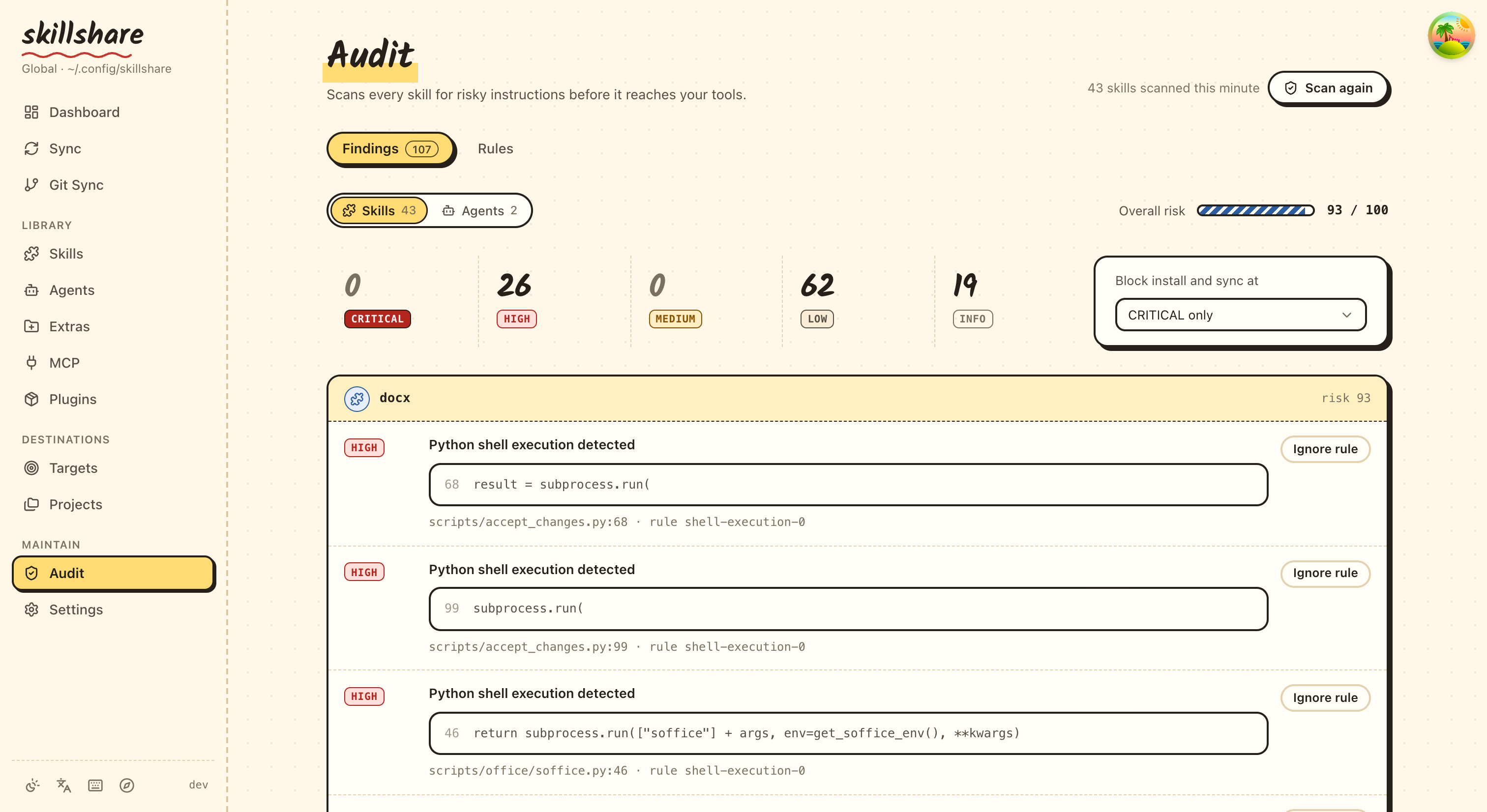
The Dashboard page includes a Security Audit section with a quick-scan summary.
Custom Rules Editor
The web dashboard includes a dedicated Audit Rules page at /audit/rules for creating and editing custom rules directly in the browser:
- Create: If no
audit-rules.yamlexists, click "Create Rules File" to scaffold one - Edit: YAML editor with syntax highlighting and validation
- Save: Validates YAML format and regex patterns before saving
Access it from the Audit page via the "Custom Rules" button.
Exit Codes
| Code | Meaning |
|---|---|
0 | No findings at or above active threshold |
1 | One or more findings at or above active threshold |
Scanned Files
The audit scans text-based files in skill directories:
.md,.txt,.yaml,.yml,.json,.toml.sh,.bash,.zsh,.fish.py,.js,.ts,.rb,.go,.rs- Files without extensions (e.g.,
Makefile,Dockerfile)
Scanning is recursive within each skill directory, so SKILL.md, nested references/*.md, and scripts/*.sh are all inspected when they match supported text file types.
Binary files (images, .wasm, etc.) and hidden directories (.git) are skipped.
Options
| Flag | Description |
|---|---|
-G, --group <name> | Scan all skills in a group (repeatable) |
-p, --project | Scan project-level skills |
-g, --global | Scan global skills |
--threshold <t>, -T <t> | Block threshold: critical|high|medium|low|info (shorthand: c|h|m|l|i, plus crit, med) |
--profile <p> | Audit profile preset: default, strict, permissive |
--dedupe <mode> | Dedup mode: legacy, global (default) |
--analyzer <id> | Only run specified analyzer (repeatable). IDs: static, dataflow, tier, integrity, metadata, structure, cross-skill |
--format <f> | Output format: text (default), json, sarif, markdown. JSON adds warnings and incomplete: true when a followed source link could not be read, so a partial scan is not mistaken for a full one |
--json | Output JSON (deprecated: use --format json) |
--yes, -y | Skip large-scan confirmation prompt (auto-confirms) |
--quiet, -q | Only show skills with findings + summary (suppress clean ✓ lines) |
--no-tui | Disable interactive TUI, print plain text output |
--init-rules | Create a starter audit-rules.yaml (respects -p/-g) |
-h, --help | Show help |
Subcommands
| Subcommand | Description |
|---|---|
rules | Browse, enable, and disable audit rules (see audit rules) |
Agent Support
skillshare audit agents scopes the security scan to agents only, scanning .md files in the agents source directory:
skillshare audit agents                    # Scan all agents
skillshare audit agents --threshold high   # Block on HIGH+ for agents
skillshare audit agents --format sarif     # SARIF output for agents
skillshare audit agents -p                 # Scan project agents
Agents are subject to the same audit rules, severity levels, and threshold gating as skills. Without the agents argument, audit scans skills only (default behavior). See Agents for background.
See Also
- Audit Engine — How the engine works (threat model, risk scoring, command tiering)
audit rules— Rule management and customization- install — Install skills (with automatic scanning)
- check — Verify skill integrity and sync status
- doctor — Diagnose setup issues
- list — List installed skills
- Securing Your Skills — Security guide for teams and organizations
- CI/CD Skill Validation — Pipeline automation recipe
- Pre-commit Hook — Automatic audit on every commit
- Agents — Agent concepts