audit
掃描已安裝的 skills,偵測安全威脅與惡意模式。
skillshare audit                        # Scan all installed skills
skillshare audit <name>                 # Scan a specific installed skill
skillshare audit a b c                  # Scan multiple skills
skillshare audit --group frontend       # Scan all skills in a group
skillshare audit <path>                 # Scan a file/directory path
skillshare audit --threshold high       # Block on HIGH+ findings
skillshare audit -T h                   # Same as --threshold high
skillshare audit --format json           # JSON output
skillshare audit --format sarif         # SARIF 2.1.0 output (GitHub Code Scanning)
skillshare audit --format markdown      # Markdown report (for GitHub Issues/PRs)
skillshare audit --json                 # Same as --format json (deprecated)
skillshare audit -p                     # Scan project skills
skillshare audit --quiet                # Only show skills with findings
skillshare audit --yes                  # Skip large-scan confirmation
skillshare audit --no-tui               # Plain text output (no interactive TUI)
skillshare audit --profile strict       # Use strict profile (block on HIGH+)
skillshare audit --dedupe global        # Full composite-key deduplication
skillshare audit --analyzer static      # Run only the static analyzer
skillshare audit --analyzer static --analyzer dataflow  # Multiple analyzers
何時使用
- 安裝新 skill 後檢視安全發現項目
- 掃描所有 skills,偵測 prompt injection、資料外洩或憑證存取模式
- 為你的組織安全政策自訂 audit 規則
- 產生合規報告(
--format json)、靜態分析工具用報告(--format sarif),或文件用報告(--format markdown) - 整合進 CI/CD pipeline,作為 skill 部署的關卡
- 將 SARIF 結果上傳到 GitHub Code Scanning,取得 PR 層級的標註
偵測內容
audit 引擎會依據 100 多條內建規則(regex 模式、表格驅動的憑證偵測、結構檢查、內容完整性驗證,以及供應鏈信任分析),掃描 skill 目錄中每一個文字型檔案,並分成 5 個嚴重程度等級:CRITICAL、HIGH、MEDIUM、LOW、INFO。
完整的偵測目錄、威脅類別深度解析、風險評分演算法、命令安全分級,以及跨 skill 互動分析,參見 Audit Engine。
輸出範例
skillshare audit
──────────────────────────────────────────────────
Scanning 12 skills for threats
mode: global
path: /Users/alice/.config/skillshare/skills
block rule: finding severity >= CRITICAL
policy: DEFAULT / dedupe:GLOBAL / analyzers:ALL

[3/12] ! ci-release-helper  (AGG MEDIUM 25/100, max HIGH)
[4/12] ✗ suspicious-skill   (AGG HIGH 35/100, max CRITICAL)

Summary
──────────────────────────────────────────────────
  Block:     severity >= CRITICAL
  Policy:    DEFAULT / dedupe:GLOBAL / analyzers:ALL
  Max sev:   CRITICAL
  Scanned:   12 skill(s)
  Passed:    9
  Warning:   2
  Failed:    1
  Severity:  c/h/m/l/i = 1/2/1/0/0
  Threats:   inj:1 exfil:1 cred:1 priv:1
  Aggregate: HIGH (35/100)
  Auditable: 100% avg
  Note:      Failed uses severity gate; aggregate is informational
Failed 統計的是發現項目達到或超過目前啟用門檻(--threshold 或 config 中的 audit.block_threshold;預設為 CRITICAL)的 skills。
Threats 以簡稱顯示所有發現項目的類別分佈:inj(injection)、exfil(exfiltration)、cred(credential)、obfusc(obfuscation)、priv(privilege)、integ(integrity)、struct(structure)、risk(risk)。沒有任何發現項目時會省略此行。在終端機輸出中,各類別會以顏色區分威脅類型。
audit.block_threshold 只控制阻擋門檻,不會停用掃描。
互動式 TUI 模式
在互動式終端機中掃描多個 skills 時,audit 指令會啟動一個由 bubbletea 驅動的全螢幕 TUI,而不是逐行印出結果。TUI 採用並排式版面:
左側面板 — 依嚴重程度排序的 skill 清單(有發現項目的排在前面),並顯示 ✗/!/✓ 狀態徽章與整體風險分數。
右側面板 — 目前選取 skill 的詳細資訊,會隨著你的移動自動更新:
- Summary:風險分數(顏色標示)、最高嚴重程度、阻擋狀態、門檻、掃描時間、嚴重程度分佈(c/h/m/l/i)
- Findings:每個發現項目顯示
[N] SEVERITY pattern、訊息、file:line位置,以及匹配的片段
操作方式:
↑↓瀏覽 skills,←→換頁/依名稱篩選 skillsCtrl+d/Ctrl+u捲動細節面板- 滑鼠滾輪可捲動細節面板
q/Esc離開
當同時滿足以下所有條件時,TUI 會自動啟動:互動式終端機、非 JSON 輸出、且結果數量大於一。使用 --no-tui 可強制輸出純文字。較窄的終端機(<70 欄)會退回垂直版面。
大量掃描確認
在互動式終端機中掃描超過 1,000 個 skills 時,指令會在繼續前提示確認。使用 --yes 可在 TTY 環境(例如本機自動化腳本)中跳過此提示。在 CI/CD pipeline(非 TTY)中,此提示會自動被跳過。
政策與 Profiles
audit 指令支援透過 profiles、去重模式與 analyzer 選擇進行政策驅動的設定。這些都可以透過 CLI flags、project config 或 global config 來設定。
Profiles
Profiles 是預先設定好門檻與去重方式的預設值:
| Profile | Threshold | Dedupe | Use case |
|---|---|---|---|
default | CRITICAL | global | 標準行為 — 只阻擋 critical 威脅 |
strict | HIGH | global | 注重安全的團隊 — 阻擋 high 以上威脅 |
permissive | CRITICAL | legacy | 僅供參考 — 阻擋最少,不做 global 去重 |
skillshare audit --profile strict       # Block on HIGH+, global dedup
skillshare audit --profile permissive   # Advisory mode
明確指定的 flags 永遠會覆蓋 profile 的預設值:
skillshare audit --profile strict --threshold medium # strict profile but block on MEDIUM+
去重(Deduplication)
當同一個發現項目被多個 analyzer 偵測到(例如同時被 static 與 dataflow 偵測到)時,去重會移除重複項目:
| Mode | Behavior |
|---|---|
global | 依複合 key 對所有發現項目做完整去重(預設) |
legacy | 僅在單一 analyzer 內去重(v0.16.9 之前的行為) |
Analyzer 選擇
預設情況下所有 analyzer 都會執行。使用 --analyzer 可只執行特定的 analyzer:
skillshare audit --analyzer static                    # Static pattern matching only
skillshare audit --analyzer static --analyzer dataflow # Multiple analyzers
| Analyzer | Scope | Description |
|---|---|---|
static | Per-file | 依 audit 規則做 regex 模式比對 |
dataflow | Per-file | 針對 shell 腳本與 markdown 程式碼區塊做污染追蹤(taint tracking) |
tier | Per-skill | 能力層級組合的風險分析 |
integrity | Per-skill | 內容雜湊驗證(SKILL.md 中的 file_hashes) |
metadata | Per-skill | 供應鏈信任驗證(發布者不符、權威性宣稱) |
structure | Per-skill | 偵測失效的 markdown 連結 |
cross-skill | Bundle | 跨 skill 的資料外洩與權限提升分析 |
你也可以在 config 中設定:
audit:
  enabled_analyzers: [static, dataflow]
優先順序
設定會依以下順序解析(第一個非空值優先):
- CLI flags(
--profile、--threshold、--dedupe、--analyzer) - Project config(
.skillshare/config.yaml) - Global config(
~/.config/skillshare/config.yaml) - Profile 預設值
自動掃描
安裝時
skills 在安裝過程中會自動被掃描。達到或超過 audit.block_threshold 的發現項目會阻擋安裝(預設:CRITICAL):
skillshare install /path/to/evil-skill
# Error: security audit failed: critical threats detected in skill

skillshare install /path/to/evil-skill --force
# Installs with warnings (use with caution)

skillshare install /path/to/skill --audit-threshold high
# Per-command block threshold override

skillshare install /path/to/skill -T h
# Same as --audit-threshold high

skillshare install /path/to/skill --skip-audit
# Bypasses scanning (use with caution)
--force 會覆蓋阻擋決策。--skip-audit 會停用該次安裝指令的掃描。
沒有任何 config flag 可以全域停用安裝時的 audit。請只在你確實想略過掃描的指令上使用 --skip-audit。
差異摘要:
| Install flag | Audit runs? | Findings available? |
|---|---|---|
--force | 是 | 是(安裝仍會繼續) |
--skip-audit | 否 | 否(掃描被略過) |
如果兩者同時提供,--skip-audit 實際上會勝出,因為 audit 根本不會執行。
更新時
skillshare update 在拉取 tracked repos 後會執行安全 audit。達到或超過目前啟用門檻(預設為 audit.block_threshold,或以 --audit-threshold / --threshold / -T 覆蓋)的發現項目會觸發 rollback。詳情參見 update --skip-audit。
你用 --force 接受的發現項目會針對該 skill 被記住,之後的更新不會因為同一條規則比對到相同文字而再次阻擋。新的發現項目,或同一條規則比對到不同文字,仍會再次阻擋。參見 Accepted Findings。
透過 install 更新 tracked repos 時(skillshare install <repo> --track --update),該關卡使用相同的門檻政策(audit.block_threshold 或 --audit-threshold / --threshold / -T)。
CI/CD 整合
audit 指令是為 pipeline 自動化設計的。在非 TTY 環境(CI runner、被 pipe 的輸出)中,互動式 TUI 與確認提示會自動停用,不需要加上 --yes 或 --no-tui。
完整的 CI/CD 工作流程(GitHub Actions、GitLab CI、SARIF 上傳、輸出格式)請參見 CI/CD Skill Validation recipe。
Pre-commit Hook
使用 pre-commit 框架,在每次 commit 時自動執行 skillshare audit。這個 hook 會掃描符合 .skillshare/ 或 skills/ 目錄的檔案,若發現項目超過你設定的門檻就會阻擋 commit。
# .pre-commit-config.yaml
repos:
  - repo: https://github.com/runkids/skillshare
    rev: v0.16.11  # use latest release tag
    hooks:
      - id: skillshare-audit
完整設定說明參見 Pre-commit Hook recipe。
最佳實務
對個人開發者而言
- 先 audit 再信任 — 從不受信任的來源安裝 skills 後,一律執行
skillshare audit - 檢視發現項目,不只看 pass/fail — 「passed」的 skill 仍可能有值得調查的 LOW/MEDIUM 發現項目
- 閱讀 skill 檔案 — 自動掃描能抓到已知模式,但新型攻擊仍需要人工檢視
對團隊與組織而言
- 設定
audit.block_threshold: HIGH— 比預設的CRITICAL更嚴格,能抓到混淆與破壞性命令 - 建立組織層級的自訂規則 — 為內部密鑰格式新增模式(例如
corp-api-key-*) - 使用 project-mode 規則做覆蓋 — 針對個別 project 降級預期中的模式,而不是全域調整
建議的 Audit 工作流程
- 安裝:skills 會自動被掃描 — 超過門檻就會被阻擋
- 定期掃描:定期執行
skillshare audit,抓出安裝後才更新的規則 - Pre-commit hook:透過 pre-commit framework 在 commit 前抓出問題
- CI 關卡:為共享的 skill repositories 在 CI pipeline 中加入 audit
- 自訂規則:依你組織的威脅模型客製化偵測
- 檢視報告:合規用
--format json,GitHub Code Scanning 用--format sarif,GitHub Issues/PRs 用--format markdown
門檻設定
在 config 檔案中設定阻擋門檻:
# ~/.config/skillshare/config.yaml
audit:
  block_threshold: HIGH  # Block on HIGH or above (stricter than default CRITICAL)
或依單次指令設定:
skillshare audit --threshold medium # Block on MEDIUM or above
完整 Audit 設定
所有 audit 設定都可以持久化在 config.yaml 中:
# ~/.config/skillshare/config.yaml (or .skillshare/config.yaml for project)
audit:
  block_threshold: HIGH                         # Blocking severity gate
  profile: strict                               # Profile preset (default/strict/permissive)
  dedupe_mode: global                           # Dedup mode (global/legacy)
  enabled_analyzers: [static, dataflow, tier]   # Limit to specific analyzers
CLI flags 會覆蓋 config 中的值。完整解析順序參見優先順序。
skillshare status 指令會顯示套用所有優先順序層級後,最終生效的 audit 政策,包括 profile、門檻、去重模式與 analyzer 清單。
Web UI
audit 功能也可以在網頁儀表板的 /audit 頁面使用:
skillshare ui
# Navigate to Audit page → Click "Run Audit"
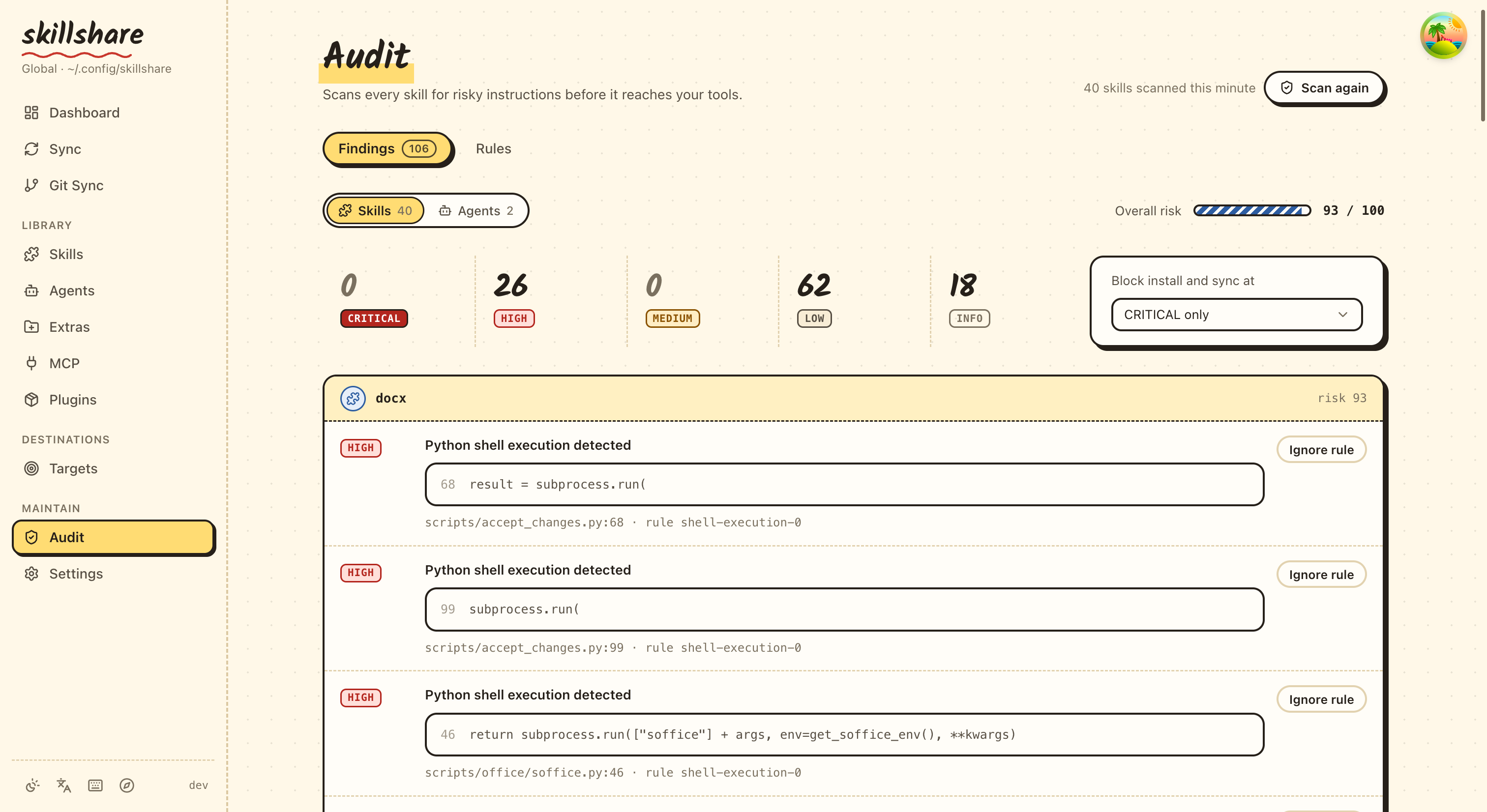
Dashboard 頁面也包含一個 Security Audit 區塊,提供快速掃描摘要。
自訂規則編輯器
網頁儀表板提供專屬的 Audit Rules 頁面(/audit/rules),可直接在瀏覽器中建立與編輯自訂規則:
- Create:如果尚未存在
audit-rules.yaml,點擊「Create Rules File」即可建立一份 - Edit:具語法標示與驗證功能的 YAML 編輯器
- Save:儲存前會驗證 YAML 格式與 regex 模式
可從 Audit 頁面透過「Custom Rules」按鈕進入。
Exit Codes
| Code | Meaning |
|---|---|
0 | 沒有發現項目達到或超過目前啟用門檻 |
1 | 有一個以上的發現項目達到或超過目前啟用門檻 |
掃描的檔案
audit 會掃描 skill 目錄中的文字型檔案:
.md、.txt、.yaml、.yml、.json、.toml.sh、.bash、.zsh、.fish.py、.js、.ts、.rb、.go、.rs- 沒有副檔名的檔案(例如
Makefile、Dockerfile)
掃描會遞迴進行每個 skill 目錄,因此 SKILL.md、巢狀的 references/*.md 與 scripts/*.sh 只要符合支援的文字檔類型,都會被檢查。
二進位檔案(圖片、.wasm 等)與隱藏目錄(.git)會被略過。
選項
| Flag | Description |
|---|---|
-G, --group <name> | Scan all skills in a group (repeatable) |
-p, --project | Scan project-level skills |
-g, --global | Scan global skills |
--threshold <t>, -T <t> | Block threshold: critical|high|medium|low|info (shorthand: c|h|m|l|i, plus crit, med) |
--profile <p> | Audit profile preset: default, strict, permissive |
--dedupe <mode> | Dedup mode: legacy, global (default) |
--analyzer <id> | Only run specified analyzer (repeatable). IDs: static, dataflow, tier, integrity, metadata, structure, cross-skill |
--format <f> | Output format: text (default), json, sarif, markdown |
--json | Output JSON (deprecated: use --format json) |
--yes, -y | Skip large-scan confirmation prompt (auto-confirms) |
--quiet, -q | Only show skills with findings + summary (suppress clean ✓ lines) |
--no-tui | Disable interactive TUI, print plain text output |
--init-rules | Create a starter audit-rules.yaml (respects -p/-g) |
-h, --help | Show help |
子指令
| Subcommand | Description |
|---|---|
rules | 瀏覽、啟用與停用 audit 規則(參見 audit rules) |
Agent 支援
skillshare audit agents 會把安全掃描的範圍限定在 agents,掃描 agents source 目錄中的 .md 檔案:
skillshare audit agents                    # Scan all agents
skillshare audit agents --threshold high   # Block on HIGH+ for agents
skillshare audit agents --format sarif     # SARIF output for agents
skillshare audit agents -p                 # Scan project agents
Agents 適用與 skills 相同的 audit 規則、嚴重程度等級與門檻阻擋機制。不加上 agents 參數時,audit 只會掃描 skills(預設行為)。背景說明參見 Agents。
另請參閱
- Audit Engine — 引擎運作方式(威脅模型、風險評分、命令分級)
audit rules— 規則管理與客製化- install — 安裝 skills(含自動掃描)
- check — 驗證 skill 完整性與同步狀態
- doctor — 診斷設定問題
- list — 列出已安裝的 skills
- Securing Your Skills — 團隊與組織的安全指南
- CI/CD Skill Validation — Pipeline 自動化 recipe
- Pre-commit Hook — 每次 commit 自動 audit
- Agents — Agent 概念